“I played Tetris for five minutes, yeah. I still see falling blocks in my dreams.” — Henk Rogers
Playable Demo on itch.io:
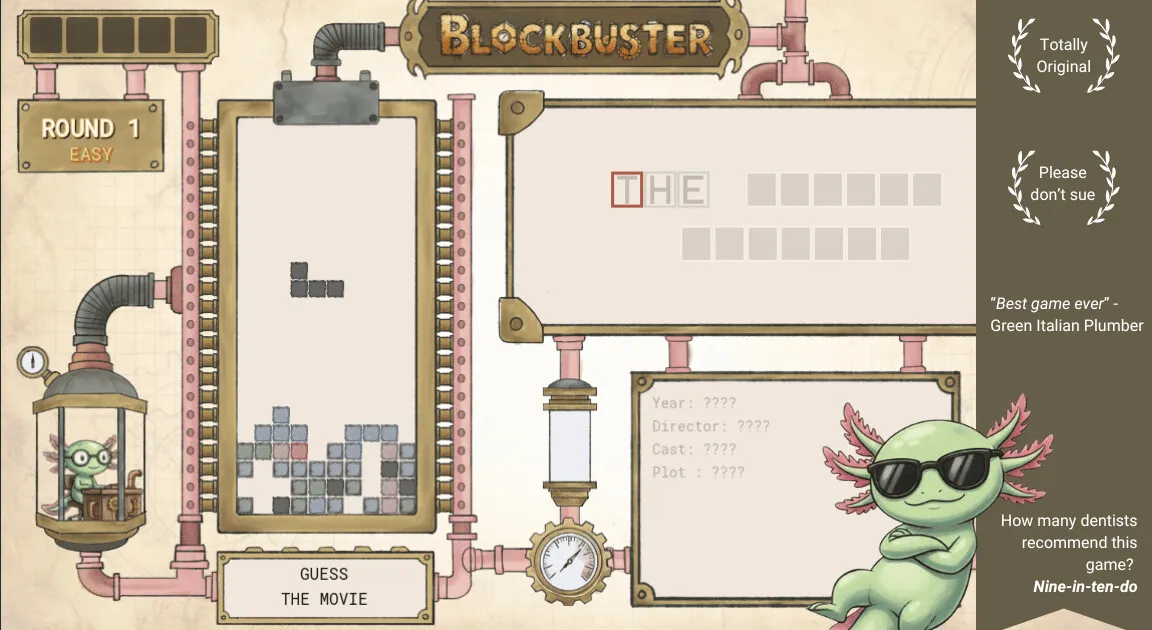
Presenting BLOCKBUSTER — hand drawn with love (except the axolotl, sue me… but please don’t).
Play a totally original block buster game and guess the names of Hollywood movies from clues revealed as you clear lines!
What started as a humble attempt by a 36-year-old beginner with no professional programming background to rebuild Tetris in Godot gradually took over my nights and weekends. Across 85+ hours, it evolved from a single square moving across a tile grid to a full-fledged release featuring custom physics, hand-drawn blueprint art, and an original game-loop mashup.
Project Highlights
- No Tutorials, No Vibe Coding: Built by learning from the official Godot documentation and fundamentals.
- Advanced Mechanics: Full SRS-style wall kicks, “Sticky” cascading line clears with flood-fill, and custom state machines.
- Hand-Drawn Visuals: Every asset sketched in a steampunk blueprint aesthetic using Procreate on an iPad.
- The Twist: An interactive Hollywood movie guessing mechanic integrated directly into the block-clearing loop, complete with a secret “Sassy Mode”.
Below is the complete devlog tracking the project’s evolution in reverse chronological order.
Project Devlog
Chronological milestones across 85+ hours: from initial falling block to final hand-drawn release.
Milestone 4: Hand Drawn With Love & An Original Twist
The final release: hand-drawn steampunk assets in Procreate, a Hollywood movie guessing twist, custom animations, and Sassy Mode.
Final progress update post. I have come too far. What started as a humble attempt at recreating Tetris took over my nights and weekends. First I was obsessed with perfecting the core game mechanics of Tetris. It was tough, it took me into the tetris.wiki rabbit hole. And I finally did it: I implemented wall-kicks, created sticky line-clears, and satisfying block clearing animations. Life was good.
But I had to go further. I had to add my own twist to the classic game. So I did. On a whim, I decided to mash a hangman-style Hollywood movie guessing game with Tetris. The idea was simple: as you clear lines, you get hints about a Hollywood movie, and you have to type the name of the movie to clear the level.
I took a break from code, picked up my iPad, and made use of Procreate that I had bought years ago but never really used. I hand drew all the assets in a steampunk style on blueprint paper. It took a lot of time, but I loved every minute of it.
I knew I was making a cardinal sin: I was interrupting the “Tetris flow” state and adding cognitive dissonance for the player, who now has to guess a movie instead of playing pure Tetris. But I was already in too deep. The challenge was to make the typing mechanic work smoothly with the core Tetris mechanics. I had to pause the falling blocks when the player was typing, and resume when they were not. I had to give feedback on correct and incorrect letters, and manage edge cases like backspaces, spaces, and punctuation. After many iterations, I finally got it to work smoothly.
Still, something was missing: there was not enough feedback, and the hints revealed were not intuitive enough. So I invested a week more in learning how to create movement and animations. I had to be resourceful: using the same hand-drawn assets and scaling, rotating, or shaking parts of the drawing. It’s not exactly The Last of Us, but it’s honest work.
In all of this I had forgotten to build basic HUD elements, so I spent another week adding a scoring system and creating rounds and level progressions.
Along the way, I also learned that the corporate entity owning the Tetris IP is famously litigious. I like to live on the edge, somewhere between creative homage and cease & desist.
Sassy Mode Easter Egg: Activated by typing A S S at any point during gameplay (and reversed with S S A). In Sassy Mode, instead of a standard plot summary, you get a hilariously poorly described plot summary for the movie.
Total time spent: 85 hours.
Milestone 3: The 'Sticky' Update to Make the Game More Fun
Implementing 'Sticky' line-clears with cascading falls using flood fill, architectural refactoring into clean classes, and state machine orchestration.

It’s only getting harder! In the previous milestone, I built a naive way of clearing lines by simply offsetting all blocks above a cleared line by 1. This sometimes left “hanging blocks” (like the ones on the left side of the animation below) which didn’t feel satisfying or physically grounded.
I played a few Tetris variants, went back to the Tetris Wiki on Line Clears, and made key improvements to make the game feel much more fun. I implemented “Sticky” line clear logic (seen on the right in the animation) with cascading clears. I also added animation delays so clears aren’t instantaneous, plus a save/load feature to test specific stack configurations.
Key Learnings:
- Refactoring the Architecture: I refactored the code substantially, and that turned out to be the best decision. I created a dedicated
GridArrayclass object and moved all properties and methods related to grid manipulation under it. The architecture is now clean:- A
Tetrominoclass to store properties and methods of falling tetromino shapes. - A
GridArrayclass to manage the stack of frozen blocks. - A
Boardobject that interfaces between the logic/calculation layer and what is rendered on screen.
- A
- Sticky Line Clear with Flood Fill: The sticky line clear logic took an entire day. I separated the line-clear code from the block movement code, then used a flood fill algorithm to identify contiguous groups of connected blocks and drop them until they hit a collision (either the floor or another frozen group).
- State Machine Necessity: Handling animations proved to be a real challenge. Adding
awaitfor animations created parallel threads that broke the game loop (such as flags failing to reset). I had to enforce strict Game State Enums (PLAY,PAUSE,ANIMATE) to ensure events only trigger when allowed. - TileMapLayer vs RigidBody2D: In hindsight, handling block animations might have been easier with
RigidBody2Dleveraging Godot’s physics engine rather than manual tile manipulation. - Signals for Decoupling: Maintained a clean separation between calculation/game logic and visual rendering by using Godot Signals to trigger rendering actions when events occur.
Time spent so far: 25 hours.
Milestone 2: Making Tetris Is Harder Than It Looks
Adding core mechanics: 7-bag randomizer, freezing tetrominos into the stack, offset array line clearing, and lerp acceleration.

Following the first milestone where tetrominos were rendering and colliding with boundaries, this update tackled the core game loop: random spawning of tetrominos, building “the stack”, freezing pieces when they land, naive line-clearing logic, and fast drop.
Key Learnings:
- Tetris Is Deceptively Complex: Compared to something like Flappy Bird, Tetris involves intricate edge cases. The line clear logic was challenging to conceptualize because of multiple standard variants. I implemented the naive version first by identifying all filled rows and creating an “offset array” storing how many units each row above must drop.
- Small Details Elevate the Game Feel: Using Godot’s
lerpfunction created a smooth acceleration when switching from normal fall speed to fast drop. Additionally, instead of pure random piece spawning, I implemented the official 7-bag randomizer with array shuffle and pop. - Separation of Concerns: Separating game logic (an array of block objects) from rendering logic (TileMapLayer and TileSets) makes iterative changes significantly easier.
- Debugging Gotcha: I made a classic mistake by directly assigning one block object to another by reference instead of performing a deep copy, which took half a day to hunt down and resolve.
Time spent so far: 15 hours.
Milestone 1: First Steps with Godot & TileMapLayer
Kicking off the journey: rendering a square block, evaluating TileMapLayer vs RigidBody2D, and spawning falling tetrominoes.
The Tetris Effect is real! If I have to start somewhere in game development, why not start with the game I have spent the most hours playing. This is not a tutorial, but rather a documentation of learning by doing.
Building games as a side-project is intimidating when you only have a few hours each week. To avoid abandoning it, I kept the scope tightly defined:
- The Basics: Render a block, create tetromino shapes, define walls/floor boundaries, and handle keyboard movement.
- Core Mechanics: Freeze pieces into the stack, implement line-clearing and fast-drop.
- HUD & Game Loop: User interface, scoring system, and game over detection.
- Graphics & Audio: Custom visual assets and sound effects.
- The Twist: An original mashup to make the game unique.
Building with TileMapLayer
I chose Godot after spending a month exploring tutorials. There are two foundational objects in Tetris: the falling blocks and the grid board. While RigidBody2D with physics was tempting, Godot’s TileMapLayer offered a lightweight 2D grid ideal for cell-based coordinates.

As a first milestone, I rendered a single block and moved it across the tile grid with arrow keys:

Next, I created the tetromino shapes. While I initially over-engineered separate classes for every concept (cells, tetrominos, board, manager), I consolidated into a clean Tetromino class to handle rotation coordinates and grid position:
Key Learnings:
- Godot’s built-in nodes like
TileMapLayerandTimereliminate unnecessary wheel reinvention. - Separating calculation/logic from visual rendering early on paid massive dividends as complexity grew.
Time spent so far: 5 hours.