Overview
Over the last four years, I’ve been deep into the quizzing rabbit hole—participating in and hosting dozens of trivia nights, pub quizzes, and family game nights. The moment I grew out of using PowerPoint slides, I hit a wall of technical limitations: how do i do buzzer rounds? how do I do audio/video clues? how do I collect answers from teams apart from them yelling it out loud.
For a while, I duct-taped together a workflow using open source buzzing web apps , WhatsApp groups, and a surprisingly clever Jeopardy board in Google Sheets (the Excel wizard that I am). It worked, sort of, but it lacked the showmanship I wanted—and it chained me to my laptop keyboard all night. Meanwhile, commercial trivia apps add needless friction with forced account signups, cloud storage, and recurring subscriptions. Much like GeoGuessr, I don’t want to pay a monthly subscription for something I pull out once in a while for friends and family.
I built Quiz Toolkit around a few core principles:
- Tailored only for live hosting (in-person or Zoom): A dedicated companion for the host to run diverse trivia formats—a polished presentation wrapper over content they already created. It also keeps the scope manageable.
- Zero onboarding friction: No account signups or app downloads for either the host or the players. Just join the room using QR code and start quizzing.
- Local & private by default: Quiz packs stay in your browser. (The only server touchpoint is lightweight buzzer arbitration).
- Host mobility: Free the host from behind the laptop screen. Control clues, buzzers, and reveals directly from a smartphone remote while working the room.
- Full creative control: Custom branding, color themes, background artwork, response modes, and scoring rules.
- Free and accessible: Free (or a small one-time payment), with zero recurring subscription traps.
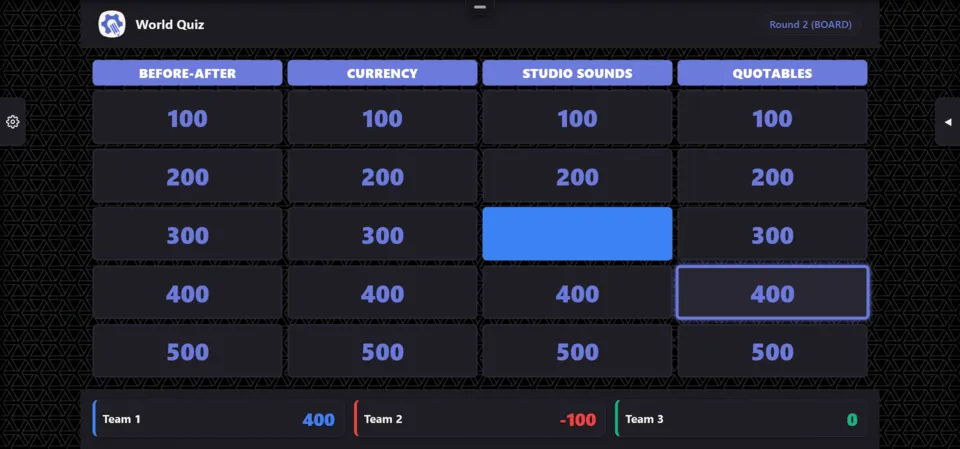
How does Quiz Toolkit achieve that?
The first clear choice was to use a form of local browser storage for quizzes (IndexedDB) that persist across window reloads, yet your quiz data doesn’t leave your browser. For long-term backup and cross-device quiz sharing, I added an Export/Import feature. And because years of my own trivia history were locked in a battle-tested Google Sheet, I added one-click Google Sheets and CSV importers.
How to keep costs low? Well, not having to store data over the cloud helps. I also instinctively removed any user auth or account creation, both to remove user on boarding friction, and to cut costs. Hosts simply spin up a “room”; players scan a QR code (or enter a 6-character code) on their phones to join that room. No app store downloads, no passwords to reset.
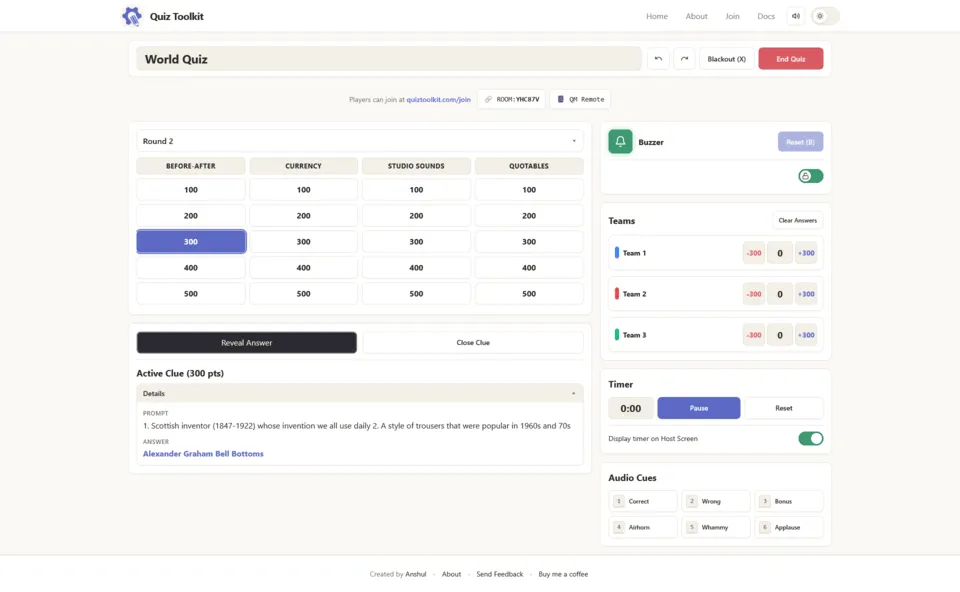
I also added a Quizmaster control. The host can project an answer-safe board onto a TV or projector while controlling the game from a separate private dashboard. Even better, scan a host QR code to use your smartphone as a handheld clicker while moving around the room.
Finally, there is a visual quiz designer which gives full customization control, and ability to set up different types of quiz formats, response methods and point systems.
Tech Stack & Architecture
Quiz Toolkit runs completely client-side in the browser:
- State Management: Zustand with typed event-driven scoring.
- Persistence: idb (IndexedDB) for quiz packs and active sessions.
- Validation: Zod schemas for all models, imported packs, and messages.
- CSS Styling: Vanilla CSS Modules and design tokens (—qz-*), strictly free of inline React styling.
- Cloudflare durable objects for buzzer relay arbitration
Dual-Window Sync & Secret Isolation
Quiz Toolkit enforces strict private/public session isolation:
- The Quiz Master (QM) Window maintains the authoritative game session, including unrevealed answers, question aliases, and host notes.
- The Presentation Window is answer-safe and runs a projection of the public session state via
BroadcastChannel. - All projected states pass through
assertNoSecrets()in development and test environments to guarantee zero data leaks before answer reveals.
sequenceDiagram
    participant QM as QM Window (Authoritative Private State)
    participant Proj as Projection Layer (assertNoSecrets)
    participant BC as BroadcastChannel ('quiz-session-channel')
    participant Pres as Presentation Window (Filtered Public View)

    Note over QM: Holds complete state<br/>(unrevealed answers, QM notes)
    QM->>QM: QM executes action (e.g. selectClue)
    QM->>Proj: Generate PublicSessionState
    Proj->>Proj: Strip unrevealed answers & secrets
    Proj->>BC: Broadcast sync event
    BC->>Pres: Receive public state update
    Pres->>Pres: Render public view (question only)

    Note over QM: QM clicks Reveal Clue
    QM->>Proj: Generate PublicSessionState (now includes answer)
    Proj->>BC: Broadcast reveal event
    BC->>Pres: Render answer reveal on screen
Remote Transport: Durable Object Room Relay
Remote rooms use a Cloudflare Durable Object (RoomDurableObject) backed by SQLite, with WebSocket Hibernation API.
Key properties:
- Per-room isolation: Six-character codes and room epochs isolate room incarnations; messages cannot cross room boundaries.
- Role boundaries & identities: Privileged roles use short-lived tickets. Player identity is connection-bound but joining remains open. The
STATE_UPDATEsnapshot sent to players is produced byprojectRemoteSessionState()on the host, which strips all private data before transmission. The DO is not involved in this filtering. - No game logic on server: The DO validates envelope structure and relays messages. The DO arbitrates the first valid buzz only. It never decides scores, answer correctness, or game progression.
- Hibernation: Idle connections allow the DO to sleep with no duration charge.
- Capacity limits: Enforced in
worker/limits.ts— max connections, payload sizes, and message rates. - Expiry: Rooms have a maximum lifetime enforced by a DO Alarm. Expired rooms reject new connections.
sequenceDiagram
    participant Host as Host Browser
    participant Worker as CF Worker (HTTP/WS routing)
    participant DO as RoomDurableObject (Cloudflare)
    participant Player as Player Browser

    Host->>Worker: POST /api/rooms {roomCode}
    Worker->>DO: Create/get stub for roomCode
    DO-->>Worker: Ready
    Worker-->>Host: {roomCode, status: ready}

    Host->>Worker: GET /ws/:roomCode?role=host
    Worker->>DO: upgradeWebSocket(role=host)
    DO-->>Host: 101 Switching Protocols (Hibernated WS)

    Player->>Worker: GET /ws/:roomCode?role=player
    Worker->>DO: upgradeWebSocket(role=player)
    DO-->>Player: 101 Switching Protocols (Hibernated WS)

    Host->>DO: STATE_UPDATE message
    DO->>Player: Relay STATE_UPDATE
    Player->>DO: pressBuzzer command
    DO->>Host: Relay pressBuzzer command
Learning And Next Steps
Setting up Cloudflare Durable Objects was easily the hardest part—it’s definitely not something you can build reliably with AI prompts alone. Also, building this over six weeks (mostly on nights and weekends) also meant embracing practical trade-offs. First, the buzzer is not perfect if 50 persons participate in a large pub and one person is on wifi while the other is using network data. Buzzer arbitrage is hard and can start brawls in a pub full of competitive drunk people over who buzzed first. I intend this to be used in groups of maximum 10-20 people. Second, the localstorage can make you lose your quiz data if you clear cache or if your browser is set-up to clear local storage on window close. If you forget to export and save your quiz, there is no cloud backup. But its a trade-off to keep the costs low.
What’s Next
- Autograding: Optional automatic answer grading to reduce cognitive load on the quizmaster.
- Expanded game formats: Native support for wager rounds, pounce rules, speed bonuses, and lightning rounds.
- More visual themes: Additional CSS style presets and seasonal skins.
- Polishing: Fix minor styling quirks discovered during live playtesting.
- App preloader: Smoother asset preloading for live presentations.